
An AI customer service agent is software that understands a customer's request in plain language, looks up the facts it needs (help articles, order and account data), and resolves the issue by answering or by taking an approved action, such as a refund or a booking change. When it is unsure, it hands the conversation to a human with the context attached.
When we started building Cevanos, we assumed the hard part would be getting the AI to sound smart. It wasn't. The hard part was making sure it did the right thing: pulling the correct order, respecting a refund limit, and admitting when something didn't work. This guide is everything we've learned along the way.
Here's the short version. Taking action is what separates an AI agent from the chatbots most people have learned to dislike. A chatbot tells you the refund policy. An agent checks your order, sees the parcel was lost, confirms you qualify and starts the refund, in about the time it took you to type the question.
Every vendor page will tell you this technology is transformative. We'd rather show you the parts they skip: what it actually costs at your volume, which pricing model can quietly cost more than human agents, how much autonomy to give it on day one, and when you shouldn't use one at all.
AI customer service agent vs. chatbot vs. copilot
A chatbot follows a script, a copilot helps a human agent work faster, and an AI customer service agent resolves the customer's issue itself. All three use AI, which is why the terms blur in marketing. When we explain the difference to a new team, we put it simply: it's about who does the work and who is accountable for the outcome.
If you've used an AI chatbot for customer service before, the lines will look blurry, and honestly, they are. We've seen well-built rule-based bots trigger simple actions, and we've seen products sold as "AI agents" that only retrieve answers. The test we use is practical: how flexibly does the system understand a request, choose a permitted next step, and check the result?
| Compared on | Rule-based chatbot | AI copilot (agent assist) | AI customer service agent |
|---|---|---|---|
| Who talks to the customer | The bot | Your human agent | The AI agent, with human backup |
| How it decides | Pre-written decision tree | Suggests replies; a human decides | Reasons over your docs, data and rules |
| Can it take action? | Only scripted steps | No, the human acts | Yes, within limits you set (refund, rebook, update) |
| Handles unexpected phrasing | Poorly | Not applicable | Well |
| Best for | Simple menus, lead capture | Complex or sensitive queues | High-volume, repeatable requests |
| Main risk | Frustration, dead ends | Low: a human reviews everything | Wrong answers or actions without guardrails |
The setups we've seen work best combine two of the three: an AI agent on the front line for repeatable volume, and a copilot helping the people who take escalations. An AI customer service platform can bring both together, while your existing helpdesk stays the place where your team picks up escalations.
How do AI customer service agents work?
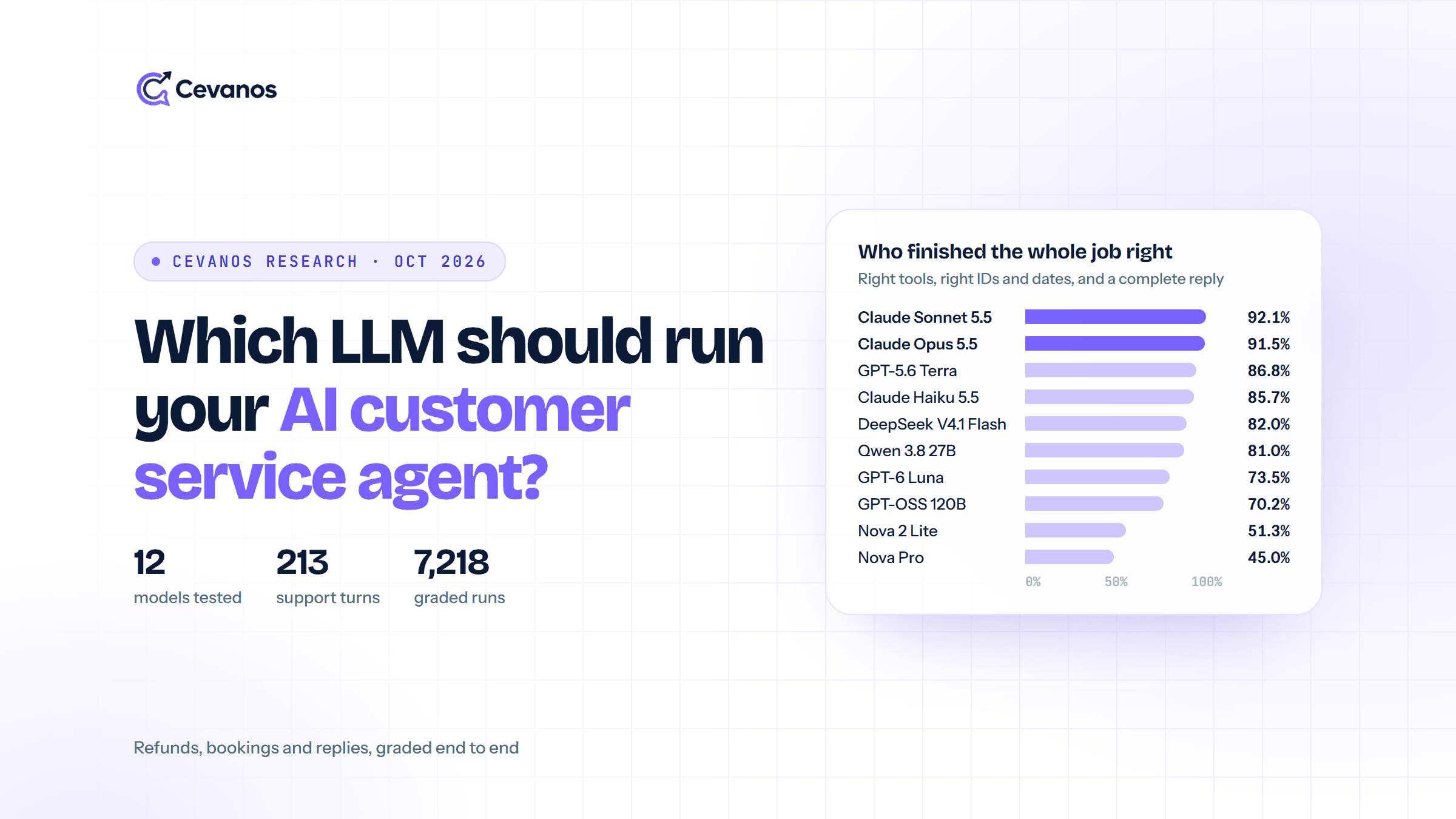
An AI customer service agent runs a loop: understand the request, retrieve the relevant facts, decide what to do, act, then check the result or hand off. A large language model (LLM) does the understanding and reasoning. We tested 12 of them in our LLM benchmark for customer service agents, and the biggest surprise was how little the model alone decides. Your knowledge, integrations and rules decide whether the agent is useful or dangerous.
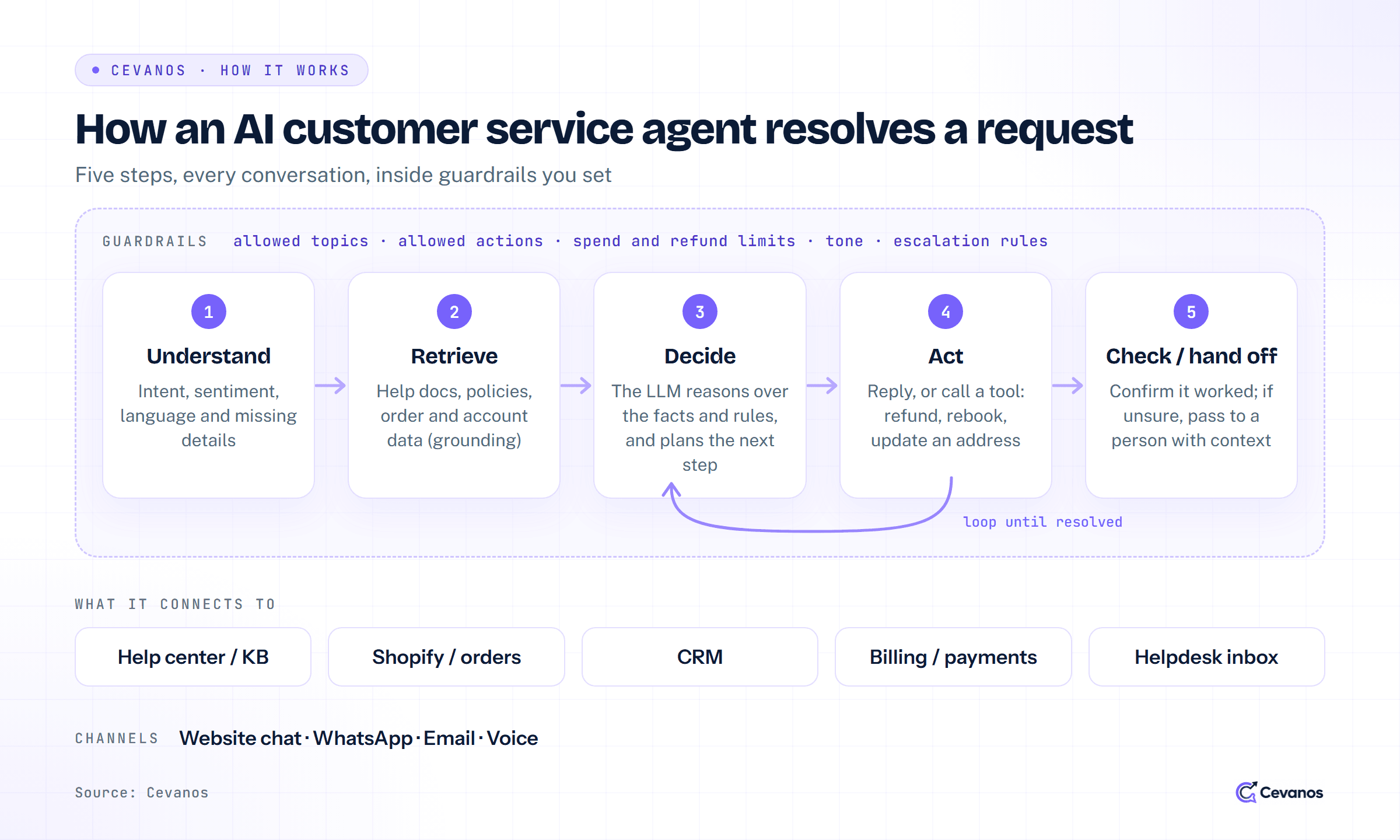
Let's walk through a request we see in some form almost every day. It's 10:47 p.m. Maya's order says delivery delayed, and the parcel is a birthday gift she needs by morning. She types: "Where is my order? I need it tomorrow."
1. Understand
The agent works out what the customer wants (intent), how they feel (sentiment) and what's missing. Maya mixes a tracking question with a deadline, so the agent has to catch both. We see this all the time: "Where's my stuff??" from a verified customer with one open order needs no follow-up question, while the same message from an anonymous visitor needs an order number or email first.
2. Retrieve (grounding)
Instead of answering from the model's general training, the agent searches your sources: help-center articles, policies, past resolved tickets, product data and, for verified customers, their orders and account. This is called retrieval-augmented generation (RAG). When we trace a bad answer back to its cause, it's usually not the model. It's missing, outdated or contradictory information. An agent is only as good as the information it can find. For Maya, the answer has to come from her actual order and the carrier's latest status, not a generic shipping policy.
3. Decide
The LLM combines the request, the retrieved facts and your rules ("replacements over $100 need a human", "never promise a delivery date the carrier hasn't confirmed") and plans the next step: answer, ask a clarifying question, call a tool or escalate. We learned early that reliable limits belong in permissions and code, not only in the prompt. That's what AI agent governance means in practice, and we come back to it below.
4. Act
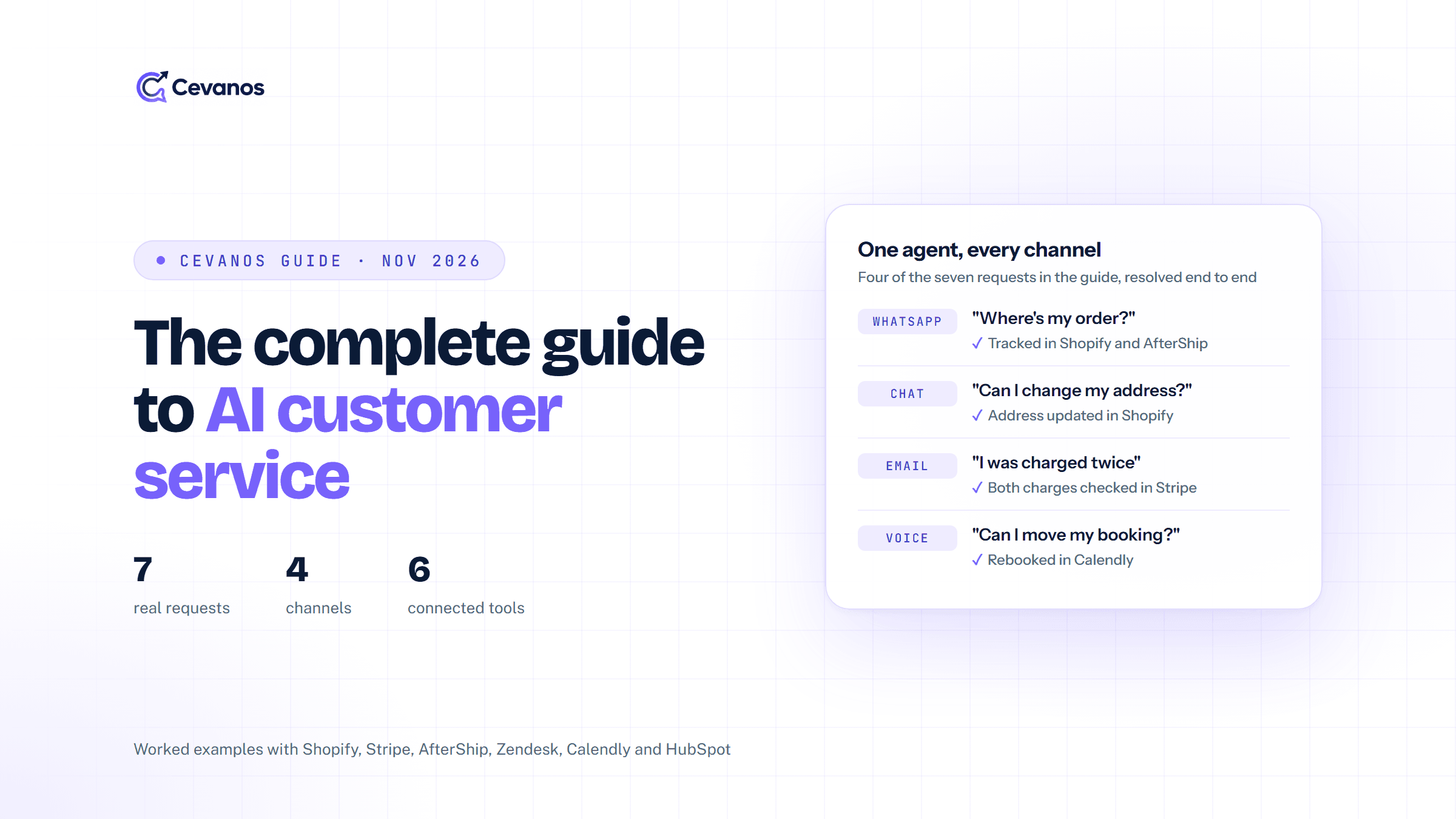
Actions are what make it an agent. Through integrations with your store, helpdesk, CRM and billing tools it can look up a shipment, start a return, change a delivery address before dispatch, cancel a subscription, rebook an appointment or create a ticket. Each action has limits you set in advance.
5. Check or hand off
A well-built agent confirms the action succeeded before saying so. We've watched actions fail quietly during testing, so we're strict about this: "Your replacement is on its way" is an unacceptable reply if the replacement call failed. If confidence is low, the customer is upset, or the request is outside its permissions, the agent passes the conversation to a person with a summary, so the customer never repeats themselves. We treat the handoff as a core feature, not an admission of failure.
The 5 levels of AI customer support autonomy
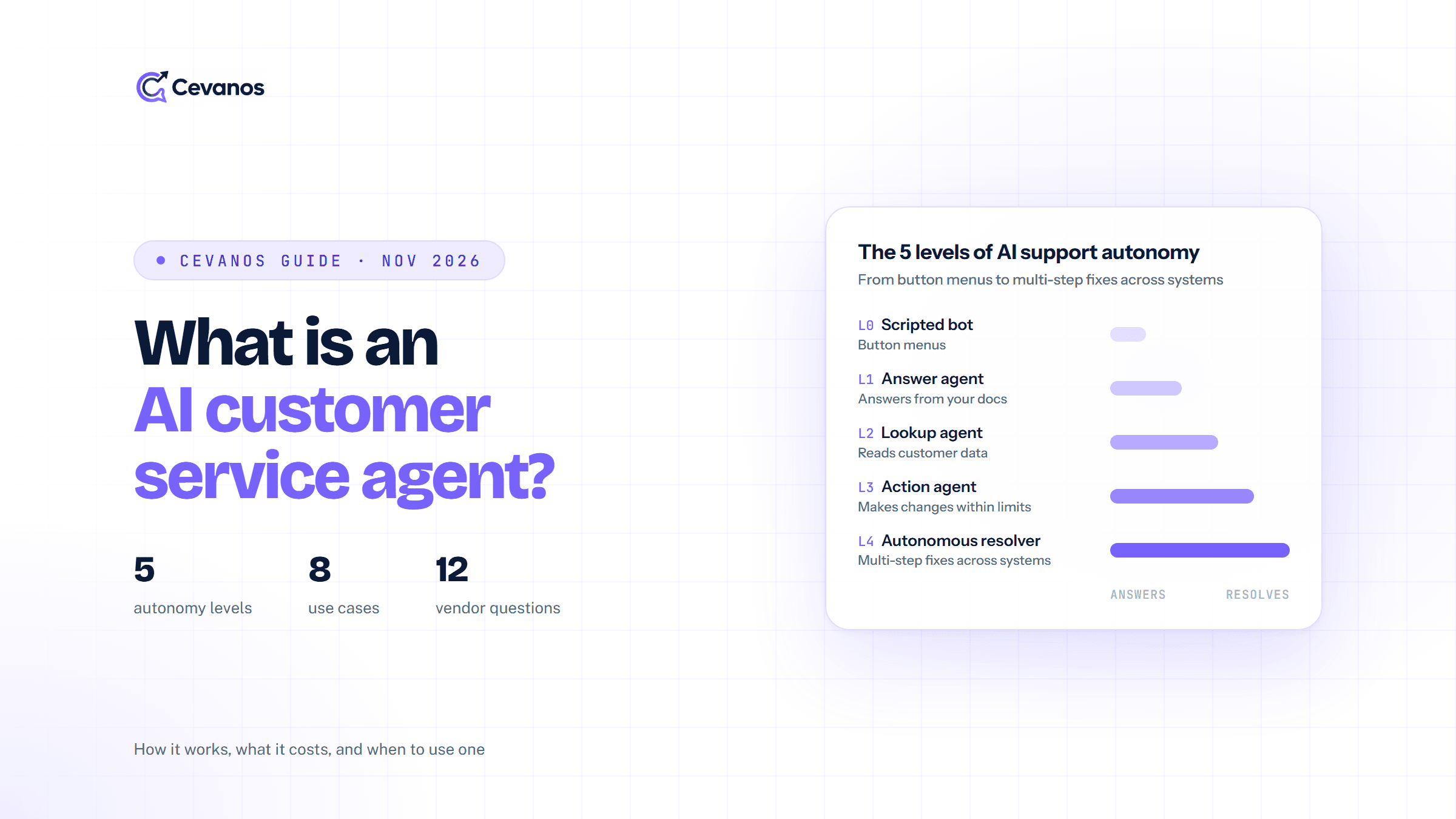
Not every AI agent should be allowed to do everything on day one. Checking Maya's order status is low risk. Changing a shipping address is more sensitive. Issuing a large refund moves real money. In every rollout we've been part of, the most useful decision was how much autonomy to give the agent, and for which requests. We use this ladder to plan it. It's our planning model, not an industry standard:
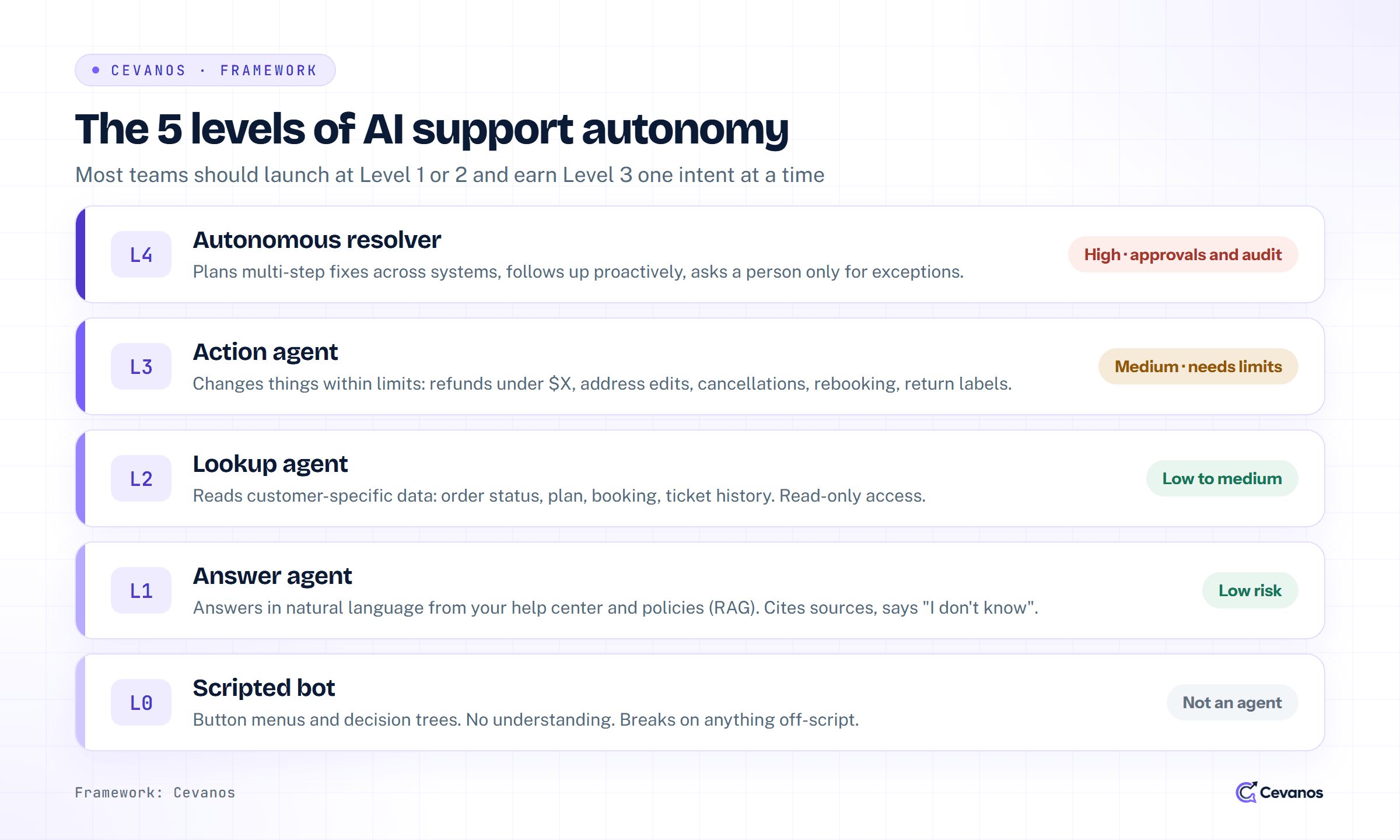
| Level | What it can do | Example | Needs |
|---|---|---|---|
| L0 Scripted bot | Button menus | "Press 1 for billing" | A flowchart |
| L1 Answer agent | Answers from your docs | "What is your return window?" | A current help center |
| L2 Lookup agent | Reads customer data | "Where is order #4821?" | Read-only integrations and identity checks |
| L3 Action agent | Makes changes within limits | "Refund my damaged item" | Write access, limits, audit log |
| L4 Autonomous resolver | Multi-step fixes across systems | Lost parcel: reship, refund shipping, notify warehouse | Approvals for exceptions, monitoring |
What we recommend: launch at L1 and L2 for your top questions, then promote individual request types to L3 once they've met your accuracy bar for a few weeks. Set autonomy per request type, not for the whole agent. "Change delivery address" can be safe at L3 long before "cancel annual contract" is. Draw the boundary by action and situation, not by asking whether the model is smart enough.
This also explains something we hear constantly: "Why did it work so well for them and not for us?" Two businesses can buy the same AI customer service software and get very different outcomes, because one runs it at L1 with a thin help center and the other runs it at L3 with clean integrations.
8 AI customer service agent use cases that work today
The use cases we see succeed are frequent, follow a clear policy and can be checked against data. These eight uses of AI agents for customer service cover most of the volume for retail and ecommerce, SaaS and technology and service businesses:
- Order status and tracking (WISMO). Often the largest single ticket type in ecommerce. The agent reads the order and carrier status and explains delays in plain language. (L2)
- Returns, exchanges and refunds. Checks eligibility against your policy, creates the return label and issues refunds under a set amount. (L3)
- Product and policy questions. Sizing, compatibility, shipping times and warranty terms, answered from your catalogue and help center. (L1)
- Account and billing changes. Update an address, change a plan, resend an invoice, explain a charge. Sensitive changes need identity checks. (L2 to L3)
- Bookings and appointments. Book, reschedule or cancel within availability rules. Common in travel and hospitality, fitness and wellness, clinics and field services. (L3)
- Troubleshooting. Walks customers through documented fixes and escalates with the steps already tried. (L1 to L2)
- Pre-sales questions and lead capture. An AI chat agent on your website answers buying questions and hands warm leads to sales. (L1)
- Triage for the human team. Even when the AI can't resolve an issue, it can collect details, create the ticket, tag, prioritise and route it, so your team starts with context. (L1)
Use cases by industry
Here's where we'd start in each of the industries we work with most:
| Industry | Most common requests | Where we'd start |
|---|---|---|
| Retail and ecommerce | Order tracking, returns, exchanges, address changes before dispatch | L2, with returns at L3 under a set amount |
| Technology and SaaS | Plan and billing questions, invoices, setup troubleshooting, cancellations | L1 to L2; cancellations and credits need approval |
| Travel and hospitality | Booking changes, availability, cancellation policy, check-in details | L2, with rebooking at L3 within fare or rate rules |
| Fitness and wellness | Class booking and rescheduling, membership questions, freezes, pricing | L3 for bookings; membership changes need approval |
| Education | Admissions and course questions, fees and deadlines, enrollment status, schedules | L1 to L2; anything touching fees or records goes to staff |
Omnichannel AI customer service: channels and integrations
An AI customer service agent is only as useful as the places customers can reach it and the systems it can reach. Customers don't pick one channel. We regularly see the same customer start on chat and follow up by email, so a customer service AI agent should keep the same knowledge, rules and history across all of them:
- Website chat: the usual starting point, for support and pre-sales questions.
- Email: drafts or sends replies to inbound tickets, with the same policies as chat.
- WhatsApp: high-volume order and booking questions in markets where customers live in messaging apps.
- Voice: answers calls, looks up the same data and transfers to a person when needed.
On the systems side, the core connections are your store or order system (for example Shopify), your helpdesk (such as Zendesk) for ticket creation and human handoff, your CRM (such as Salesforce) for account context, and billing for refunds and invoices. Having tested a lot of integrations ourselves, here's what we check for each one: which operations it actually exposes (read only, or write) and whether you can limit each one separately.
Benefits of AI-powered customer service, and the bar to clear
When an AI agent works well, we see the customer experience change in three visible ways:
- Help arrives when the problem happens. Maya's question doesn't wait for the next shift. That matters across time zones and during sales peaks.
- Your team stops doing predictable lookups. They spend their time on disputes, worried customers and complex accounts instead.
- Customers don't navigate your internal systems. The order system, help center, carrier and helpdesk are all involved, but the customer sees one conversation.
None of that excuses poor answers. Genesys' 2026 State of Customer Experience report found that 84% of consumers would give a virtual agent no more than three attempts to resolve an issue. That matches what we see in transcripts: customers give an agent very few chances. Speed without a useful outcome is just a faster way to frustrate someone.
Why customers don't trust AI agents, and how to earn it
Customers don't distrust AI because it's AI. They distrust it because it has failed them before. We've watched customers type "agent" or "human" in their very first message, before the AI has said anything, and we've seen people ask for a person even after the AI gave them the right answer. Years of bots that looped, guessed or blocked the way to a person taught them to.
Ada's 2026 survey of 2,000 consumers puts numbers on what we see:
- 59% prefer instant AI over waiting for a human, but only if it resolves the issue.
- Only 24% said their most recent AI interaction was fully resolved by AI alone.
- 57% would stop using a company's AI if they couldn't reach a human when needed, yet only 14% of businesses offer easy escalation at any point.
- Consumers ranked accuracy first and a clear path to a human second. Empathy came last.
Our takeaway: trust is earned by resolution plus a visible way out, not by sounding human. These are the six things we do to build it:
- Keep answers short and specific. Answer the question asked, using the customer's own order or account, then stop.
- Show where an answer came from. A link to the policy or help article makes a correct answer believable.
- Never hide the human. Offer a person at any point, and hand over with context so nothing is repeated.
- Only confirm what actually happened. Say "your refund is processed" only after the payment system confirms it.
- Give it the authority you'd give a trusted new hire, and no more. Good support teams let frontline staff issue small credits without a manager. We give the AI the same bounded authority, with approvals above it.
- Let your team back it up. When a customer escalates and the AI was right, have your staff confirm the answer specifically. Over time customers learn the AI is reliable.
How much does an AI customer service agent cost?
Published usage prices from the major vendors run from about $1 to $2 per resolution or per conversation, and many tools also sell monthly plans with included usage, plus your setup and maintenance time. When teams ask us to compare quotes, we always start with the pricing model rather than the headline price, because some models charge whether or not the AI actually solved the problem.
The four pricing models
| Model | How you pay | Published examples (checked 6 Nov 2026) | Watch out for |
|---|---|---|---|
| Per resolution (outcome-based) | When the AI resolves the conversation | Intercom Fin: $0.99 per outcome. Zendesk: $2 per automated resolution pay-as-you-go, with plan allowances and committed-volume discounts | How "resolved" is defined. Some definitions include certain handoffs |
| Per conversation or per action | Every conversation or action the AI handles | Salesforce Agentforce: $2 per conversation, or Flex Credit pricing per action | You pay for failures too (see the chart below) |
| Subscription or credit plan | Monthly plan with message or credit limits | Many SMB tools, from roughly $30 to several hundred dollars a month | Overage fees; limits that count every message |
| Build your own | LLM usage plus engineering time | A few cents of model usage per conversation | Engineering, evaluation and maintenance are the real cost |
These are examples, not equivalent quotes. Seat fees, channel charges and implementation can sit on top, and prices change often, so confirm current terms before you buy. On the build-your-own row, we speak from experience: in our benchmark, model usage was the cheap part. The engineering, testing and evaluation around it were not.
The number that matters: effective cost per resolution
Effective cost per resolution = total monthly AI cost (usage + platform + upkeep) ÷ conversations the AI actually resolved
A $2-per-conversation price at a 40% resolution rate is really $5 per resolution, which may be as much as a human-handled ticket. A $0.99-per-resolution price stays $0.99 at any resolution rate. Our advice: ask every vendor for your expected resolution rate on your own tickets, not their best customer's.
A worked example
Here's the model we use with teams. Take a business handling 5,000 conversations a month, where a human-handled ticket costs about $5 (salary, benefits, tools and management divided by tickets handled; it ranges from about $2 offshore to $15 or more for phone support in high-cost markets). Add about $400 a month of staff time to maintain the agent's knowledge and review conversations.
| AI resolution rate | All-human | AI at $1 per resolution | AI at $2 per conversation |
|---|---|---|---|
| 30% | $25,000 | $19,400 (22% less) | $27,900 (12% more) |
| 50% | $25,000 | $15,400 (38% less) | $22,900 (8% less) |
| 70% | $25,000 | $11,400 (54% less) | $17,900 (28% less) |
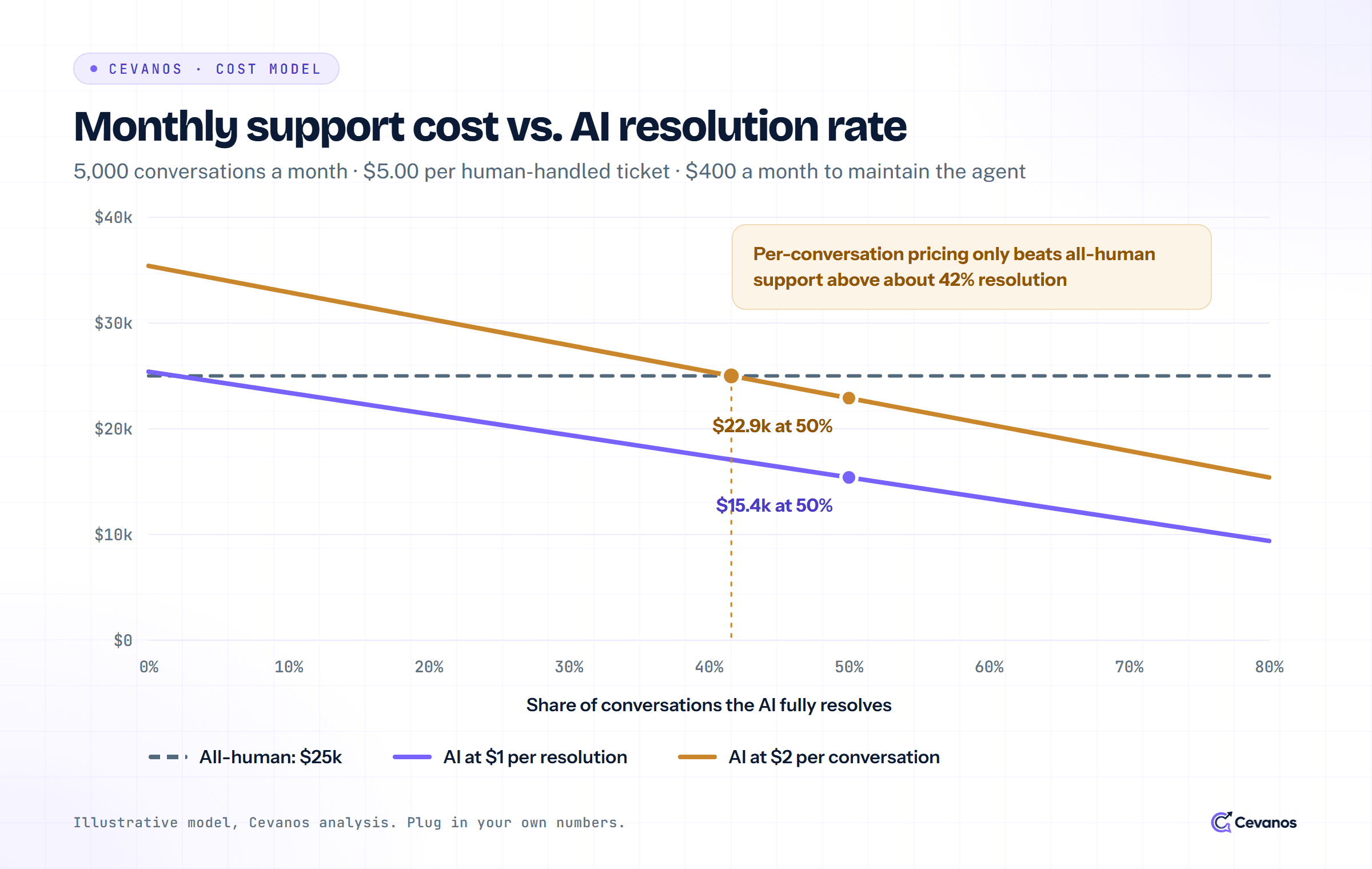
Three things this model makes obvious:
- Resolution rate drives everything. Moving from 30% to 70% resolution saves more than any discount you'll negotiate. Spend your effort on knowledge and integrations.
- Per-conversation pricing is riskiest in your first 90 days, when resolution rates are usually lowest.
- Savings are only real if your staffing plan changes. If the AI handles half your tickets but headcount stays the same, you've bought capacity (faster replies, room to grow) rather than savings. In our view, that's often the better outcome anyway.
Gartner predicts that by 2029 agentic AI will autonomously resolve 80% of common customer service issues without human intervention, cutting operational costs by 30%. We'd treat that as a direction of travel, not a number for your first-year budget.
When should you use an AI customer service agent?
Use one when a large share of your tickets are repeat questions with documented answers, and the data needed to resolve them is reachable by API. We've seen what happens when those conditions aren't met: the agent produces polite, confident, wrong answers. Fix the gap first.
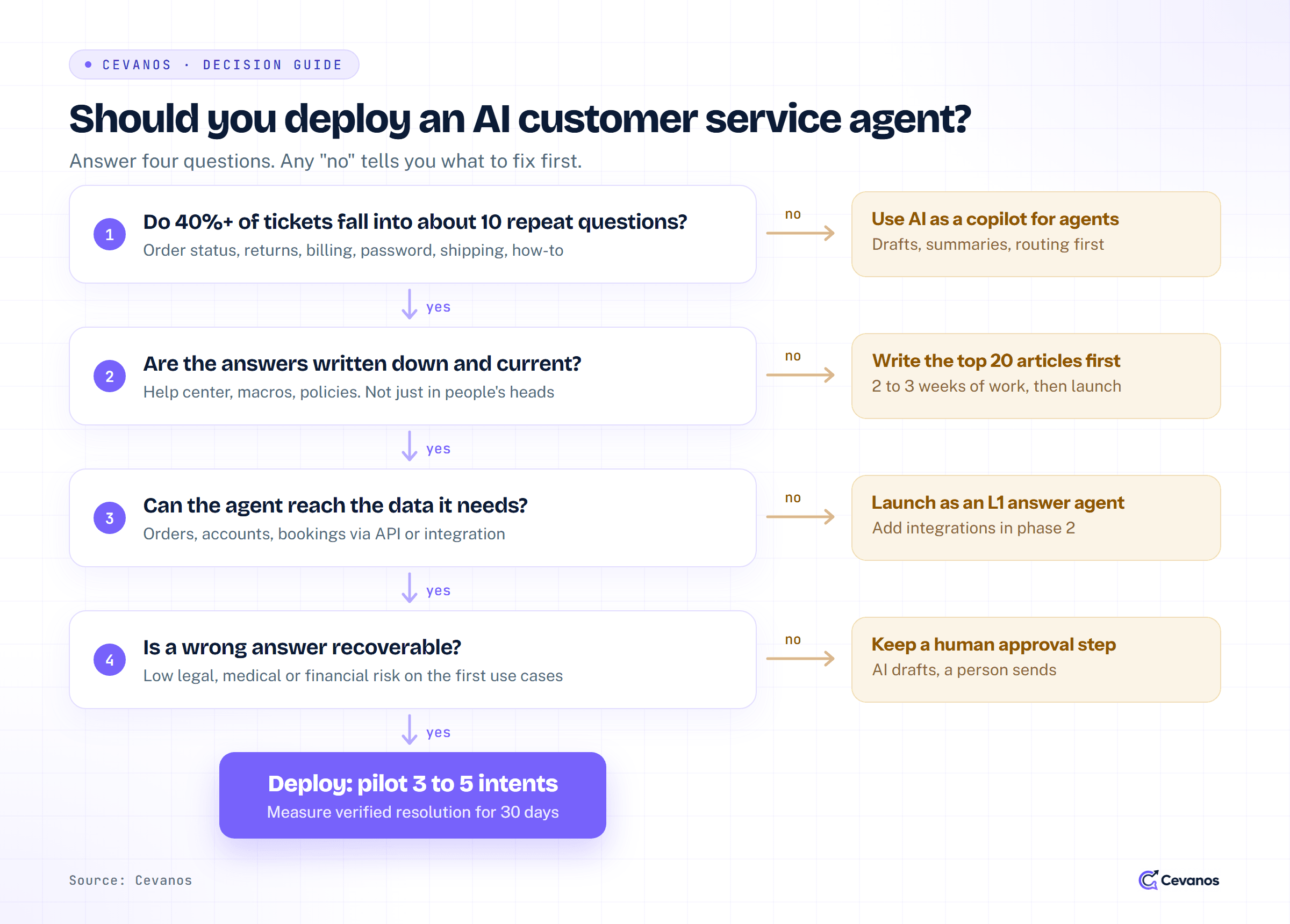
Good fit
- Several hundred or more conversations a month, with a large share in your top 10 question types
- An up-to-date help center or internal macros you can feed it
- Customers in several time zones, or demand peaks (sales, launches, holidays) you can't staff for
- Ecommerce, SaaS, subscriptions, travel, fitness and bookings: anything with orders, accounts or schedules
Poor fit (for now)
- Very low volume. If one person comfortably handles everything, setup and upkeep may not pay back yet. A copilot may help more.
- Every ticket is unique, as with bespoke B2B projects or complex claims.
- Answers live in people's heads. This is the most common blocker we run into. Write the top 20 articles first; that work pays off even without AI.
- High-stakes, regulated advice (medical, legal, financial) without human review.
How to measure success: resolution, not deflection
Maya closes the chat. Is that a success? Maybe she got a replacement confirmation. Or maybe she gave up because the bot kept repeating itself. From the dashboard alone, those two outcomes can look identical. We've learned not to trust a closed chat until we know which one it was.
Measure verified resolution, the share of conversations where the customer's problem was actually solved, not deflection, the share that never reached a human. Deflection is the most common vanity metric we see in AI customer support because it counts a customer who left frustrated as a win.
| Metric | What it tells you | Healthy signal |
|---|---|---|
| Verified resolution rate | Customer confirmed it was solved, or did not contact you again about the same issue within a set window (for example 72 hours) | Rising month on month, tracked per request type |
| Escalation quality | Does your team receive a useful summary, and is the handoff fast? | Agents rarely need to re-ask questions |
| AI CSAT vs. human CSAT | Satisfaction tracked separately for AI-resolved and human-resolved chats | AI CSAT close to human CSAT |
| Wrong-answer rate | Sampled weekly by a person reviewing transcripts | Falling; every error becomes a doc fix |
| Action success rate | Share of attempted actions that completed correctly | Failures are caught and never reported to customers as done |
| Repeat-contact rate | Customers coming back about the same issue | Lower than before launch |
Track these per request type, and report AI and human performance separately. Ada found that 55% of businesses measure them together, which hides what the AI actually achieves. A 60% overall resolution rate might hide 90% on order tracking and 10% on billing disputes, and that split tells you exactly where to work next. The question we ask behind every metric is simple: did the customer's situation improve, and can we tell?
Risks of AI customer service agents and how to prevent them
The main risks are wrong answers, wrong actions, data exposure and customers trapped in loops, and each has a known guardrail. We test for every one of these before an agent goes live, because the legal risk is real. In Moffatt v. Air Canada (February 2024), Air Canada's website chatbot told a grieving customer he could claim a bereavement fare after travelling, which contradicted the airline's policy. British Columbia's Civil Resolution Tribunal rejected the argument that the chatbot was responsible for its own statements and ordered the airline to pay about C$812 in damages, interest and fees (ABA analysis). Your AI's answers are your company's answers.
| Risk | What it looks like | Guardrail |
|---|---|---|
| Hallucination | Confidently invents a policy or feature | Answer only from retrieved sources, and allow "I can't confirm that, let me get a person" |
| Wrong action | Refunds the wrong order or too much | Per-action limits, identity checks, confirmation before changes, full audit log |
| Data exposure | Shares one customer's data with another | Verify identity before any lookup; least-privilege data access; check storage and model-training terms |
| Prompt injection | A message or document tries to override the agent's rules | Enforce rules in code and permissions, not only in the prompt; test with adversarial inputs |
| Escalation loops | Customer can't reach a human | Always offer a "talk to a person" path; auto-escalate on frustration or repeated failure |
| Knowledge drift | Policies change but docs don't | An owner for each article, review dates, weekly transcript sampling |
How to set up an AI customer service agent: a 30-day pilot
Start narrow: pick 3 to 5 high-volume request types, launch on one channel, and measure verified resolution for 30 days before expanding. This is the plan we follow ourselves:
- Days 1 to 5: Pick the request types. Export the last 90 days of tickets and group them by reason. Choose 3 to 5 frequent, low-risk ones, such as order status, return policy and shipping times.
- Days 6 to 12: Fix the knowledge. Rewrite or create the articles behind them. One clear answer per article, with policies stated explicitly ("refunds within 30 days of delivery").
- Days 13 to 16: Connect and set limits. Connect order and account data read-only (L2). Define identity checks and escalation rules: angry sentiment, refunds, anything outside the chosen request types.
- Days 17 to 20: Test with real history. Replay 100 to 200 past tickets plus edge cases: missing information, conflicting policies, tool errors, unauthorized action attempts. We count a fluent wrong answer as a failure. Fix the docs, not just the prompt.
- Days 21 to 30: Go live on one channel, usually website chat, with your team reviewing transcripts daily. Review the metrics above at day 30, then add request types, channels or L3 actions.
Treat this as a template, not a promise. Complex integrations, procurement and security reviews can take longer.
What we learned building Cevanos
Everything above comes from building and testing AI customer service agents ourselves. Four lessons changed how we designed our product, and they apply whichever tool you choose.
1. A connected integration is not a working integration
We learned this while testing integrations like Shopify, Airtable and Front. Getting connected was usually the easy part. The real problems started when the agent tried to act: required data was missing, an API had limits, or the action wasn't configured correctly. That's when we realized every integration has to be tested with real customer scenarios, not just a successful API connection.
2. "Can" is not the same as "may"
An agent might be capable of issuing refunds, updating orders or changing customer details. That doesn't mean every request should be allowed. This was one of the biggest reasons we focused on governance: we built policies and approvals so businesses control what the agent may do, instead of relying entirely on instructions given to the AI.
3. A rule in a prompt is a suggestion
It's easy to tell an AI not to refund more than $50. But putting that in a prompt isn't enough. We wanted limits like that checked separately from the AI's own decisions. Our 12-model benchmark showed why: across 7,218 graded runs, even the most accurate model made a few unwanted write actions, and the weakest made dozens. So Cevanos checks policies outside the model, and we added Observe and Enforce modes so teams can see how a policy behaves before actively applying it.
4. A truthful failure beats a fake success
We paid close attention to this during integration testing. Some actions couldn't complete because data was missing, an API had limits, or the order wasn't eligible. In one case a refund couldn't go through because the order had no paid amount to refund. The worst thing an agent can do then is confidently tell the customer "Your refund has been processed" when nothing happened.
We learned that being honest about a failure matters as much as completing an action. The agent should explain what went wrong, never claim success without confirmation from the connected system, and offer the next step or a person. That's why we focused on execution results, monitoring and audit trails in Cevanos. An AI customer service agent shouldn't just sound helpful. It should be trustworthy, especially when something goes wrong.
How Cevanos approaches this
We built Cevanos around the path described in this guide: start with answers, then let the agent act only where you've decided it may.
- Answers from your knowledge. Train the agent on your website, help center and documents, then deploy it to website chat, email, WhatsApp and voice.
- Actions through 40+ integrations, including Shopify, Zendesk and Salesforce: manage orders, create tickets, schedule appointments and capture leads.
- Policies you write in plain English and we enforce outside the model, with spending limits per decision, identity checks before sensitive actions, and an approval queue for anything above your limit.
- Observe and Enforce modes. Run a new policy in Observe mode to see what it would have done, then switch to Enforce when you trust it. Simulate conversations against past tickets before customers see a change.
- Monitoring and audit trails. Every decision, including each refusal, is logged with the policy and sources it used.
- Human handoff with context: summary, sentiment, sources and order history go to your team.
If you only need website answers and a couple of actions, you can skip the governance layer and switch it on later. We'd love for you to explore the platform, browse integrations or see plans.
12 questions to ask any AI customer service agent vendor
These are the questions we'd ask if we were buying, and the ones we expect to answer ourselves:
- What resolution rate should we expect on our own tickets? Can we test on our historical data before signing?
- How exactly do you define and bill a "resolution"?
- What is our effective cost per resolution at 30%, 50% and 70%?
- Which actions can the agent take, and can we set limits per action and per request type?
- How does handoff work? Does the human get a summary? Which helpdesks do you integrate with?
- Can the agent say "I don't know", and can we see which sources it used for each answer?
- How do we review conversations and correct mistakes, and how fast do fixes take effect?
- Which channels are supported: website chat, email, WhatsApp, social, voice?
- Where is our data stored, is it used to train models, and which certifications are complete versus in progress?
- How do you protect against prompt injection and unauthorized data access?
- Which languages are supported, and is quality equal across them?
- What does it take to leave: can we export conversations, knowledge and settings?
Frequently asked questions
What is an AI customer service agent?
An AI customer service agent is software that understands customer questions in plain language, looks up answers in your knowledge base and business systems, and resolves the request, including approved actions such as refunds, bookings or ticket updates. It hands the conversation to a human when it is unsure or the issue is sensitive.
What is the difference between an AI customer service agent and an AI chatbot?
A traditional chatbot follows pre-written scripts and decision trees. An AI agent understands free-form questions, reasons over your data and policies, and takes permitted actions in other systems. A chatbot can tell you the return policy; an agent can check eligibility and process the return.
Why don't customers trust AI customer service agents?
Mostly because earlier bots failed them by looping, guessing or blocking the path to a person. In our experience, customers will happily use AI when it resolves the issue and a human is always reachable. Short, sourced answers, honest confirmation of actions and easy escalation build trust over time.
What is agentic AI in customer service?
Agentic AI in customer service means AI that can plan and carry out steps toward resolving a request, such as looking up an order, checking a policy and creating a return, rather than only generating a reply. We believe it should always run inside limits the business sets, with approvals for higher-risk actions and a clear path to a human.
How much does an AI customer service agent cost?
Published usage prices from major vendors run from about $1 to $2 per resolution or per conversation, and many tools also sell monthly plans with included usage. We recommend comparing offers by effective cost per resolution: total monthly AI cost divided by the conversations the AI actually resolved.
Can an AI customer service agent issue refunds?
Some can, when connected to a commerce or payment system that exposes the action. We'd always require identity checks, policy eligibility, amount limits and human approval above a threshold before any refund is issued.
Can an AI customer service agent work across chat, email, WhatsApp and voice?
Many platforms support several channels, but channel coverage and feature parity vary. Check that conversation history and escalation context carry over when a customer switches channels.
Will AI agents replace human customer service teams?
We don't think so. They replace much of the repetitive work, not the need for people. Complex, emotional and high-stakes conversations still need human judgment. A November 2026 Gartner survey found 21% of service leaders had reduced human agent headcount because of AI, which is a meaningful shift but not wholesale replacement.
How long does it take to set up an AI customer service agent?
An answer-only agent trained on an existing help center can go live quickly. A pilot with integrations, identity checks, testing on past tickets and escalation rules usually takes about a month. In our experience most of the time goes into knowledge quality and permissions, not the technology.
What is a good resolution rate for an AI customer service agent?
It depends on your request mix, documentation and integrations. Track verified resolution per request type and look for steady month-on-month improvement. Narrow, data-backed requests such as order tracking usually resolve at much higher rates than billing disputes. Be wary of deflection figures that count abandoned chats as success.
Is it safe to give an AI agent access to customer data?
It can be, with identity verification before any lookup, the minimum data access needed, action limits, audit logs, and clear vendor commitments on data storage and model training. We tell teams to treat it like giving system access to a new employee.
The bottom line
Maya never wanted an AI demonstration. She wanted to know whether a birthday gift would arrive, and what the store could do if it didn't. A useful AI customer service agent gets her there: it finds the right information, takes an authorized next step, confirms what happened, and brings in a person when needed.
That's the standard we hold our own agents to, and it's the one we'd suggest for yours. Start with a few request types at low autonomy, measure verified resolution rather than deflection, choose pricing that charges for outcomes, and give the agent more responsibility as it earns it. Automate the work you can explain, measure the problems you actually solve, and keep people in control of the exceptions.
Sources
- Ada, "What 2,000 consumers told us about AI customer service", 26 March 2026. ada.cx
- Cevanos, "Best LLM for an AI customer service agent? We tested 12 models", 27 October 2026. cevanos.ai
- Genesys, 2026 State of Customer Experience report. genesys.com
- Gartner, survey on AI-driven headcount reductions in service and support, 5 November 2026. gartner.com
- Gartner, agentic AI to resolve 80% of common customer service issues by 2029, 5 March 2025. gartner.com
- Gartner, 50% of organizations will abandon plans to reduce customer service workforce due to AI, 10 June 2025. gartner.com
- Klarna AI assistant results, February 2024: OpenAI customer story. May 2025 hiring reversal: Entrepreneur
- Moffatt v. Air Canada, 2024 BCCRT 149: American Bar Association analysis
- Pricing pages for Intercom, Zendesk and Salesforce Agentforce, checked 6 November 2026
- AI customer service agent
- AI agents for customer service
- AI customer support agent
- agentic AI customer service
- AI customer service software